Restoration 386 and pentium
20160305 jean huensWorking 386 with IDE disk, 5" floppy, 3" floppy, no network
3" floppy drive broken
backup on 5" and 3" floppies
Working pentium with ide disk and 3" floppy
To get all info on "modern" computer with no floppies
Using IDE to usb adapter (StarTech.com USB3SSATAIDE)
Works for ide disk out of pentium.
Does not work for IDE disk of 386
Using IDE computer (GXPRO) with linux (Knoppix 3.3)
The Seagate ST1441A has a complex jumper setting. After figuring
the out we can read/mount use the 386 IDE disk.
But:
1) ik kan de Seagate ST3144Aschijf van je oude computer nu op een andere
computer probleemloos lezen.
 (het probleem waren de jumper settings van de schijf...)
 Ik heb een fysische backup gemaakt van de schijf.

2) nu het slechte nieuws op die 130Mb schijf staan heel weinig bestanden:
 Zie script in attach.
 het meest opvallende is die DBLSPACE.000

Die DBLSPACE is een programma van Microsoft om extra schijfruimte te
maken op MSDOS

zie uitleg : https://msdn.microsoft.com/en-us/library/cc722457.aspx

En microsoft heeft Doublespace gedumpt ergens tussen windows 98 en
windows ...
Dus behalve de MSdos op jouw computerschijf zie ik niet direct iets dat
de DBLSPACE.000 kan decoderen.

3) In 1994 heeft iemand linux software gemaakt om Doublespace te lezen.
Ik heb eens naar de code gekeken
 - Doublespace compacteerd een compleet file systeem.
 - er schijnen meerdere compressie algoritmes te zijn (en alleen
algorime 2 is geimplementeerd).
 - de linux kernel waarvoor het geschreven is is heel oud
 Ik denk niet dat dit een haalbare piste is, in ieder geval is er veel
programmeer werk aan.
Script:
Strategy:Script started on Tue Mar 1 17:06:48 2016
root@knoppix3:~/seagatbackup# mount -t vfat -o ro /dev/hdb /win
root@knoppix3:~/seagatbackup# cd /win
root@knoppix3:/win# ls -l
total 100244
-rwxr--r-- 1 root root 132520 May 27 1999 4dosswap.000
-r-xr--r-- 1 root root 102379008 Jan 4 1980 dblspace.000
-r-xr--r-- 1 root root 51252 Mar 19 1993 dblspace.bin
-r-xr--r-- 1 root root 91 Jan 22 1980 dblspace.ini
-r-xr--r-- 1 root root 40774 May 31 1994 io.sys
-r-xr--r-- 1 root root 38138 May 31 1994 msdos.sys
drwxr--r-- 2 root root 2048 Oct 28 1995 reserve
root@knoppix3:/win# cat dblspace.ini
MaxRemovableDrives=2
FirstDrive=D
LastDrive=H
MaxFileFragments=114
ActivateDrive=H,C0
root@knoppix3:/win# file dblspace.000
dblspace.000: data
root@knoppix3:/win# ls reserve
386spart.par
root@knoppix3:/win# file reserve/386spart.par
reserve/386spart.par: data
root@knoppix3:/win# ls -l reserve/386spart.par
-rwxr--r-- 1 root root 12568576 Jun 23 1995 reserve/386spart.par
root@knoppix3:/win# df -h
Filesystem Size Used Avail Use% Mounted on
/dev/hda2 69G 2.2G 64G 4% /
/dev/root.old 2.2M 341K 1.8M 16% /initrd
/dev/hdb1 125M 118M 7.3M 95% /win
root@knoppix3:/win# cd /
root@knoppix3:/# umount /dev/hdb1
root@knoppix3:/#
Script done on Tue Mar 1 17:51:22 2016
Dus wat blijft er:

A) 3 inch floppy drive op jouw computer vervangen door een werkende
versie lijkt me doenbaar.
 op computerwetenschappen liggen spares. En hopelijk weet jij nog hoe
je met floppies werkt.

B) dan moet op je oude computer de bestanden die je wil bewaren op 3"
floppies gezet worden.

 - ik reken erop dat Doublespace van de floppies afblijft
(=waarschijnlijk)
 - das werk voor jou en floppies maken kost tijd

C) die 3 " floppies kan je dan lezen op de nieuwere computer en daar op
schijf zetten.

D) die schijf kan dan via USB<=>IDE adapter aan een moderne computer
gehangen worden.

Sorry maar die DOUBLESPACE dwarsboomt de hele zaak.
On the internet there is more information about DBLSPACE=DRIVESPACE
http://superuser.com/questions/745650/need-to-read-a-windows-98-drvspace-000-file-in-windows-7
Since we did have a raw disk image of the ide disk we did follow a different technique:
Make a Virtual machine with the raw disk image
# virt-install -n win98 -r 512 --os-type=windows --os-variant=win7 --disk /var/lib/libvirt/images/w98.raw,device=disk,bus=ide --nonetworks --vnc --noautoconsole --import
# cat /etc/libvirt/qemu/win98.xml
<!--
WARNING: THIS IS AN AUTO-GENERATED FILE. CHANGES TO IT ARE LIKELY TO BE
OVERWRITTEN AND LOST. Changes to this xml configuration should be made using:
 virsh edit win98
or other application using the libvirt API.
-->

<domain type='kvm'>
 <name>win98</name>
 <uuid>5513def7-7c0c-7040-08d8-411737f5a8c9</uuid>
 <memory unit='KiB'>262144</memory>
 <currentMemory unit='KiB'>262144</currentMemory>
 <vcpu placement='static'>1</vcpu>
 <os>
 <type arch='x86_64' machine='pc-i440fx-trusty'>hvm</type>
 <boot dev='hd'/>
 </os>
 <features>
 <acpi/>
 <apic/>
 <pae/>
 </features>
 <clock offset='localtime'/>
 <on_poweroff>destroy</on_poweroff>
 <on_reboot>restart</on_reboot>
 <on_crash>restart</on_crash>
 <devices>
 <emulator>/usr/bin/kvm-spice</emulator>
 <disk type='file' device='disk'>
 <driver name='qemu' type='raw'/>
 <source file='/var/lib/libvirt/images/w98.raw'/>
 <target dev='hda' bus='ide'/>
 <address type='drive' controller='0' bus='0' target='0' unit='0'/>
 </disk>
 <controller type='usb' index='0'>
 <address type='pci' domain='0x0000' bus='0x00' slot='0x01' function='0x2'/>
 </controller>
 <controller type='pci' index='0' model='pci-root'/>
 <controller type='ide' index='0'>
 <address type='pci' domain='0x0000' bus='0x00' slot='0x01' function='0x1'/>
 </controller>
 <serial type='pty'>
 <target port='0'/>
 </serial>
 <console type='pty'>
 <target type='serial' port='0'/>
 </console>
 <input type='tablet' bus='usb'/>
 <input type='mouse' bus='ps2'/>
 <input type='keyboard' bus='ps2'/>
 <graphics type='vnc' port='-1' autoport='yes'/>
 <video>
 <model type='vga' vram='9216' heads='1'/>
 <address type='pci' domain='0x0000' bus='0x00' slot='0x02' function='0x0'/>
 </video>
 <memballoon model='virtio'>
 <address type='pci' domain='0x0000' bus='0x00' slot='0x03' function='0x0'/>
 </memballoon>
 </devices>
</domain>
This virtual machine boot, runs msdos and expands the filesystem
using doublespace.
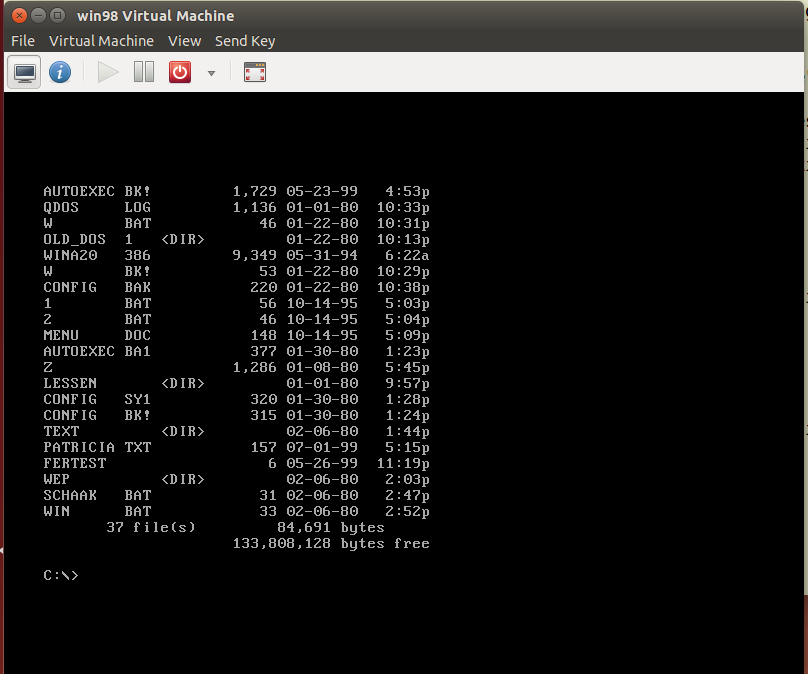
Now we add another disk
ON linux:
- qemu-img create -f raw ....win98.img 200Mb
- fdisk ...win98.img
- create empty MBR
- create FAT16 partition
- Add this disk to our virtual machine and boot it up
- Msdos boot up with azerty keyboard (we have US qwerty)
- MSdos boots up there is no easy command to show disks
- VOL C:
- VOL D:
show a filesystem
- XCOPY C: D: /A /E
produces a lot of output
and ends with
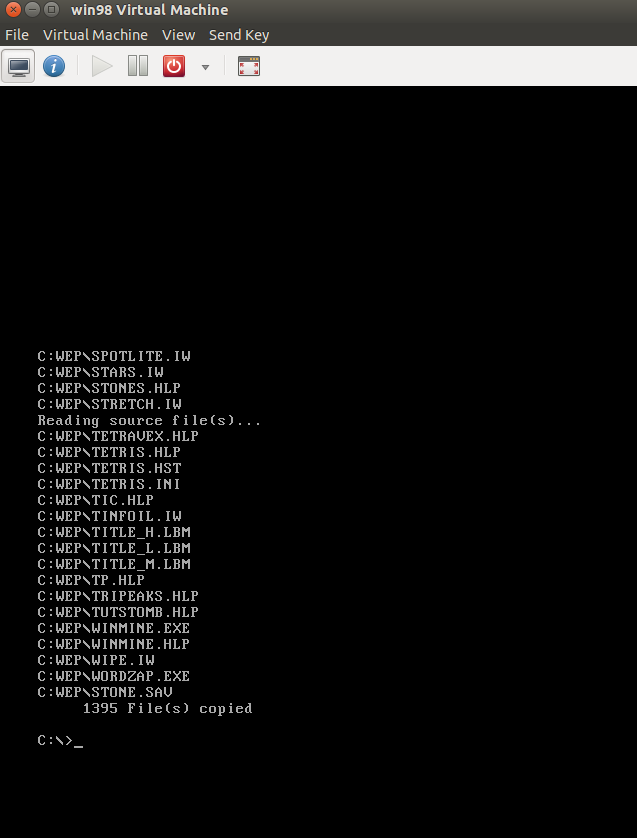
- DIR C:
- DIR D:
- output is similar
- Dos virtual machine stopped
mount the dos partition to verify if DLBLSPACE did not touch it :
- First we make a backup raw disk image
root@roosje:/var/lib/libvirt/images# cp win98.img win98.img.20161117
- We need the offset of the Filesystem on the disk image:
root@roosje:/var/lib/libvirt/images# fdisk ./win98.img.20161117

Command (m for help): p

Disk ./win98.img.20161117: 209 MB, 209715200 bytes
127 heads, 37 sectors/track, 87 cylinders, total 409600 sectors
Units = sectors of 1 * 512 = 512 bytes
Sector size (logical/physical): 512 bytes / 512 bytes
I/O size (minimum/optimal): 512 bytes / 512 bytes
Disk identifier: 0xc3f9a803

 Device Boot Start End Blocks Id System
./win98.img.20161117p1 2048 409599 203776 6 FAT16

Command (m for help): q - The partition starts at block 2048 : 2048*512 = 1048576 bytes
- mkdir /mnt/dos
- mount
root@roosje:/var/lib/libvirt/images# mount -t vfat -o loop,offset=1048576,ro ./win98.img.20161117 /mnt/dos/
- THIS LOOKS OK
root@roosje:/var/lib/libvirt/images# ls -l /mnt/dos
total 164
-rwxr-xr-x 1 root root 56 Oct 14 1995 1.BAT
-rwxr-xr-x 1 root root 46 Oct 14 1995 2.BAT
-rwxr-xr-x 1 root root 13228 Aug 23 1991 AMOUSE.COM
-rwxr-xr-x 1 root root 377 Jan 30 1980 AUTOEXEC.BA1
-rwxr-xr-x 1 root root 266 Jun 12 1999 AUTOEXEC.BAT
-rwxr-xr-x 1 root root 1729 May 23 1999 AUTOEXEC.BK!
-rwxr-xr-x 1 root root 207 Jun 25 1995 AUTOEXEC.SAV
-rwxr-xr-x 1 root root 220 Jan 22 1980 CONFIG.BAK
-rwxr-xr-x 1 root root 315 Jan 30 1980 CONFIG.BK!
-rwxr-xr-x 1 root root 320 Jan 30 1980 CONFIG.SY1
-rwxr-xr-x 1 root root 199 Jun 12 1999 CONFIG.SYS
drwxr-xr-x 2 root root 4096 Mar 5 17:28 DISKDUPE
drwxr-xr-x 2 root root 4096 Mar 5 17:28 DOCUMENT
drwxr-xr-x 3 root root 8192 Mar 5 17:21 DOS
-rwxr-xr-x 1 root root 6 May 27 1999 FERTEST
drwxr-xr-x 2 root root 4096 Mar 5 17:26 FS
drwxr-xr-x 4 root root 4096 Mar 5 17:29 LESSEN
-rwxr-xr-x 1 root root 148 Oct 14 1995 MENU.DOC
drwxr-xr-x 2 root root 4096 Mar 5 17:28 OLD_DOS.1
-rwxr-xr-x 1 root root 157 Jul 1 1999 PATRICIA.TXT
drwxr-xr-x 3 root root 4096 Mar 5 17:26 PCTOOLS
drwxr-xr-x 2 root root 4096 Mar 5 17:28 QDOS
-rwxr-xr-x 1 root root 1136 Jan 1 1980 QDOS.LOG
drwxr-xr-x 2 root root 4096 Mar 5 17:28 RESERVE
drwxr-xr-x 2 root root 4096 Mar 5 17:27 SCHAAK
-rwxr-xr-x 1 root root 31 Feb 6 1980 SCHAAK.BAT
drwxr-xr-x 4 root root 8192 Mar 5 17:29 TEXT
-rwxr-xr-x 1 root root 46 Jan 22 1980 W.BAT
-rwxr-xr-x 1 root root 53 Jan 22 1980 W.BK!
drwxr-xr-x 2 root root 4096 Mar 5 17:30 WEP
-rwxr-xr-x 1 root root 33 Feb 6 1980 WIN.BAT
drwxr-xr-x 4 root root 8192 Mar 5 17:23 WINDOWS
drwxr-xr-x 6 root root 4096 Mar 5 17:26 WINWORD
drwxr-xr-x 8 root root 4096 Mar 5 17:27 WP51
-rwxr-xr-x 1 root root 1286 Jan 8 1980 Z

root@roosje:/var/lib/libvirt/images# ls -l /mnt/dos/TEXT
total 3768
-rwxr-xr-x 1 root root 5810 Jan 4 1980 A
-rwxr-xr-x 1 root root 5300 Jan 4 1980 AVAKJAN
-rwxr-xr-x 1 root root 3961 Jan 4 1980 AVAKJAN.BK!
-rwxr-xr-x 1 root root 11212 Jan 4 1980 BALLINA
-rwxr-xr-x 1 root root 11212 Jan 4 1980 BALLINA.BK!
-rwxr-xr-x 1 root root 2962 Apr 22 1998 BBC16
-rwxr-xr-x 1 root root 14677 Jan 4 1980 BEELEN
...
-rwxr-xr-x 1 root root 7103 Jan 4 1980 BOSMANS
-rwxr-xr-x 1 root root 4374 Jan 4 1980 BOSMANS.2
... - Even libreoffice is able to read those WP files !!!!
root@roosje:/mnt/dos# rsync -av --progress ./ /media/jean/96A6-429E/
or
root@roosje:/mnt/dos# cp -av ./ /media/jean/96A6-429E/